
Setting up a Minimal C Development Environment for Kernel Module Building
You’ve compiled thousands of C programs.
gcc hello.c -o hello, maybe throw in some-Wall -O2, done. Now you want to write a kernel module. You trygcc -o hello.ko hello_module.cand get a wall of undefined references.linux/module.hexists but nothing links. Welcome to kernel space, where everything you know about C compilation is wrong.
Why Standard Compilation Fails
Kernel modules aren’t programs. They’re not linked against libc. They don’t have a
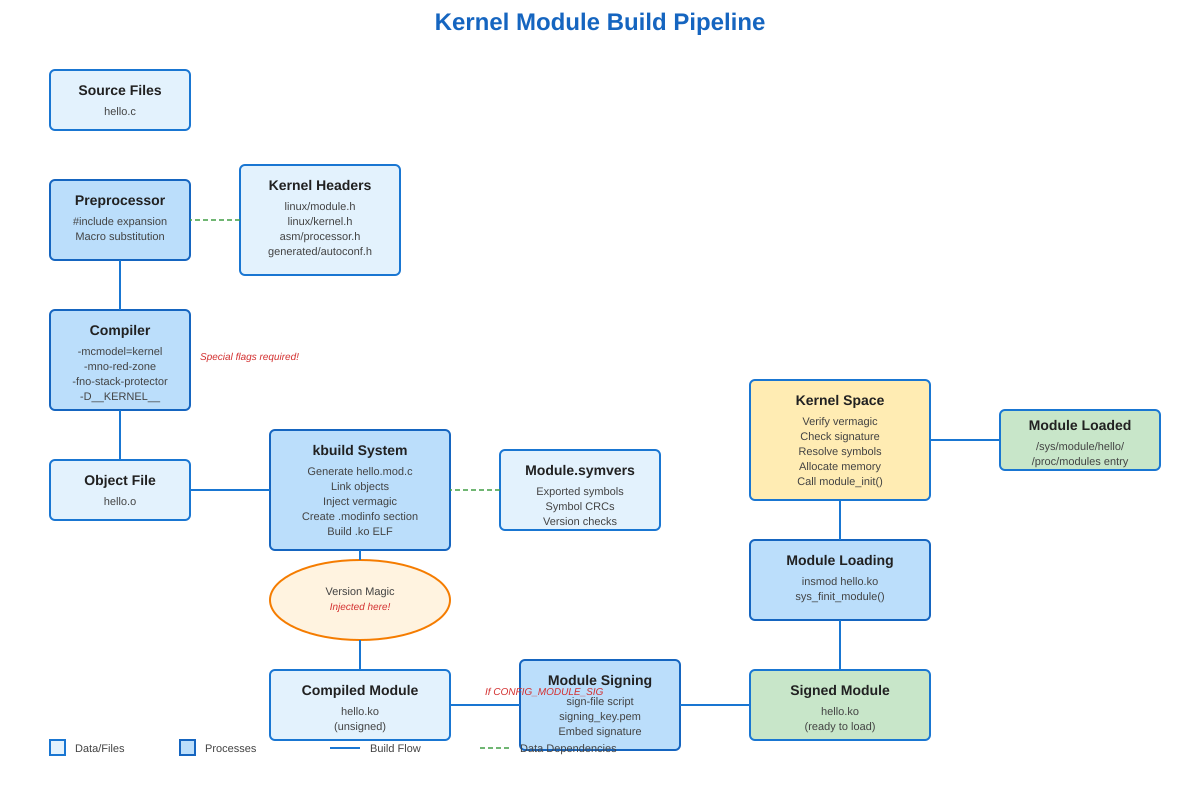
main(). They run in kernel space with different calling conventions, different stack layout, and zero tolerance for mistakes. On x86-64, the kernel uses a different memory model (-mcmodel=kernel) and disables the red zone (-mno-red-zone) because interrupts would corrupt it. Try to useprintf()and you’ll get linker errors - there’s no libc in kernel space. You useprintk()instead, which writes to a kernel ring buffer thatdmesgreads.The killer detail: your module must be compiled with the exact same compiler version and flags that built your running kernel. The kernel doesn’t have a stable ABI. If Ubuntu built kernel 6.2.0 with gcc 11.4, and you compile your module with gcc 12, you’re gambling with memory corruption. The kernel embeds a “version magic” string in every module: kernel version, compiler version, SMP status, and more. Load a module with mismatched magic and
insmodwill reject it before it can crash your system.
The kbuild System: Not Your Makefile
Writing hello.ko: hello.o in a Makefile won’t work. Kernel modules use kbuild - a recursive make system that lives in /lib/modules/$(uname -r)/build/. Your Makefile just declares obj-m := hello.o and then invokes: make -C /lib/modules/$(uname -r)/build M=$(PWD) modules. That -C changes directory into the kernel build tree. M=$(PWD) tells kbuild where your source is. The kernel’s build system does the heavy lifting: preprocessor magic, generating version strings, symbol CRC calculation, everything.
When kbuild runs, it creates Module.symvers - a file tracking every exported symbol and its CRC. If your module calls kmalloc(), kbuild verifies that symbol exists and that its function signature matches what the kernel exported. Change a parameter type in the kernel and the CRC changes, preventing version mismatches at load time.
The build process generates multiple artifacts: hello.mod.c (autogenerated glue code), hello.o (your code), hello.mod.o (module metadata), and finally hello.ko (the loadable module). Run modinfo hello.ko and you’ll see the vermagic string, license, author, parameters, dependencies - all embedded in an ELF section called .modinfo.
Real Module Signing Hell
Modern systems enable CONFIG_MODULE_SIG_FORCE. Every module must be cryptographically signed or the kernel refuses to load it. When you build an out-of-tree module, it’s unsigned by default. Try insmod ./hello.ko on a signing-enforced system:
insmod: ERROR: could not insert module hello.ko: Key was rejected by service
You need signing keys. The kernel build process generates signing_key.pem and signing_key.x509, but they’re usually not accessible. You generate your own key pair, sign your module with sign-file from the kernel scripts directory, and enroll your key in the system’s MOK (Machine Owner Key) list if UEFI Secure Boot is active. Miss any step and your module won’t load, no matter how correct the code is.
What You Actually Need
Minimum viable environment:
linux-headers-$(uname -r)- EXACT match to your running kernel, not “latest”. Check withuname -rfirst.build-essential- gcc, make, and binutils. Ideally, the same gcc version used for kernel build (check/proc/version).bc,flex,bison,libelf-dev,libssl-dev- kbuild dependencies that fail silently if missing.Module utilities: usually installed with the kernel, but verify
modprobe,insmod,lsmod,modinfoexist.
Install on Ubuntu/Debian: apt install linux-headers-$(uname -r) build-essential bc flex bison libelf-dev libssl-dev. On Arch: pacman -S linux-headers base-devel. The headers package installs to /lib/modules/$(uname -r)/build/ and includes kernel config (.config), build scripts (scripts/), and architecture-specific headers (arch/x86/include/).
Verification That Actually Works
Build a minimal module. Create hello.c:
#include <linux/module.h>
#include <linux/kernel.h>

static int __init hello_init(void) {
    printk(KERN_INFO "Hello from kernel space\n");
    return 0;
}

static void __exit hello_exit(void) {
    printk(KERN_INFO "Goodbye from kernel space\n");
}

module_init(hello_init);
module_exit(hello_exit);

MODULE_LICENSE("GPL");
MODULE_AUTHOR("Your Name");
MODULE_DESCRIPTION("Minimal kernel module");
Create Makefile:
obj-m += hello.o

all:
	make -C /lib/modules/$(shell uname -r)/build M=$(PWD) modules

clean:
	make -C /lib/modules/$(shell uname -r)/build M=$(PWD) clean
Run make. Success looks like:
make -C /lib/modules/6.2.0-39-generic/build M=/home/user/module modules
make[1]: Entering directory '/usr/src/linux-headers-6.2.0-39-generic'
  CC [M]  /home/user/module/hello.o
  MODPOST /home/user/module/Module.symvers
  CC [M]  /home/user/module/hello.mod.o
  LD [M]  /home/user/module/hello.ko
  BTF [M] /home/user/module/hello.ko
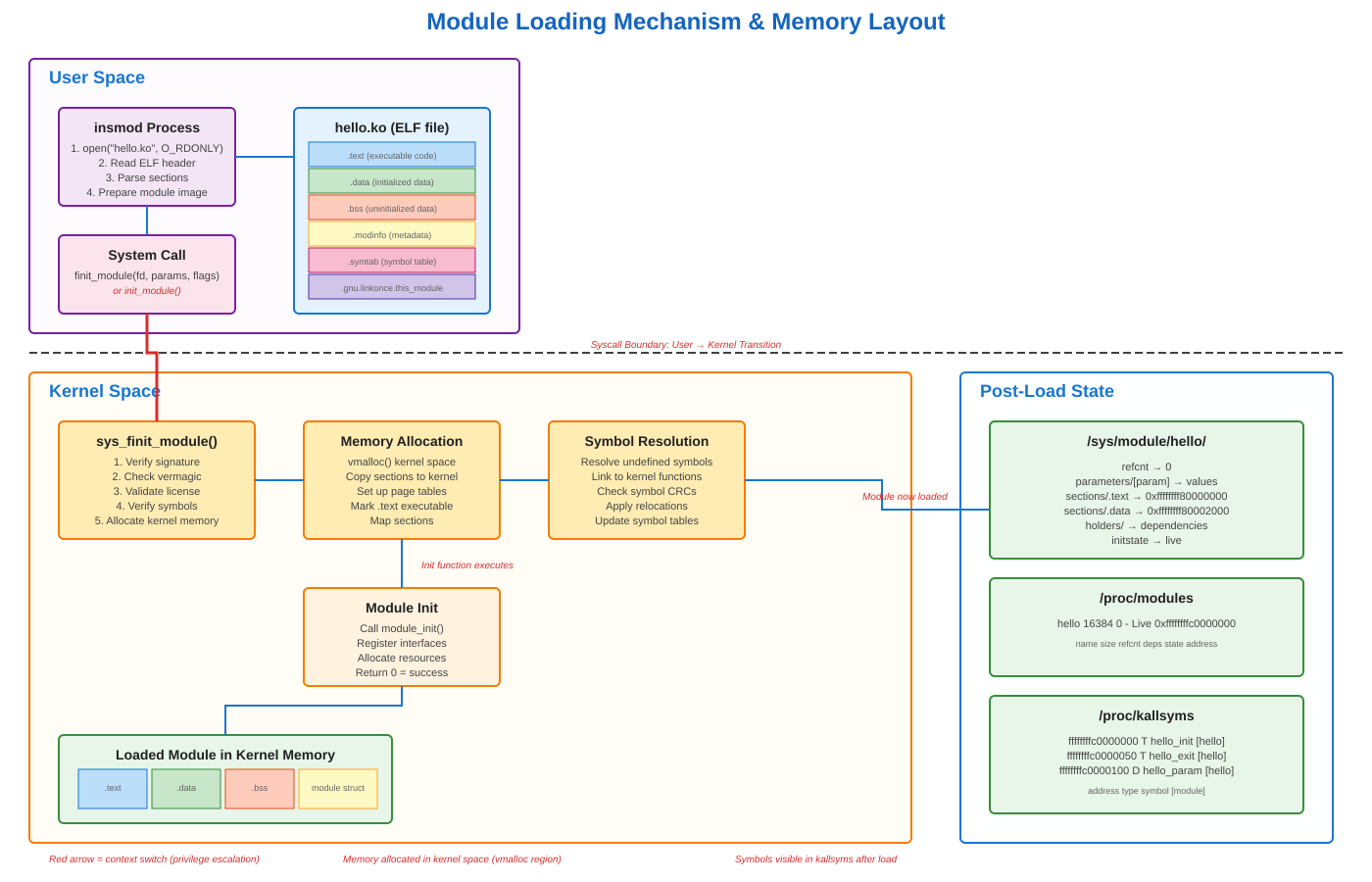
That BTF line? Modern kernels embed BPF Type Format for better introspection. Check what you built: modinfo hello.ko. Look for vermagic - it should match cat /proc/version_signature. Load it: sudo insmod hello.ko. Verify: lsmod | grep hello. Check kernel log: dmesg | tail -1. You should see “Hello from kernel space”. Inspect: cat /sys/module/hello/refcnt (should be 0). Unload: sudo rmmod hello. Check dmesg again - “Goodbye from kernel space”.
If any step fails, you’ve found your problem. Wrong headers? Version magic mismatch. Missing dependencies? Unresolved symbols at load time. Module signing? Check dmesg for “module verification failed” messages. These concrete failures teach you more than any tutorial.
The build environment isn’t complicated once you understand it’s not normal C compilation. It’s a specialized system for creating code that runs with ring-0 privileges, sharing address space with the kernel, where a null pointer dereference means instant panic. Get the environment right and building modules becomes mechanical. Get it wrong and you’ll spend hours debugging invisible ABI mismatches.
Building a Complete Development Environment
Github Link :
https://github.com/sysdr/howtech/tree/main/kernel_module_build/kernel-module-demoNow that you understand the theory, let’s build a proper development setup. We’ll create a module with parameters, a real-time monitor, and all the tools you need to experiment safely.
Step 1: Verify Your System
First, check what you’re working with:
# Check your kernel version
uname -r

# Verify kernel headers are installed
ls -la /lib/modules/$(uname -r)/build

# Check your compiler
gcc --version

# See what compiled your kernel
cat /proc/version
The compiler versions should match reasonably close. If your kernel was built with gcc 11 and you have gcc 12, that’s usually fine. But gcc 9 vs gcc 13 might cause problems.
Step 2: Create the Module Source
Create a file called hello_module.c with parameters you can change at load time:
#include <linux/module.h>
#include <linux/kernel.h>
#include <linux/init.h>

/* Module parameters - can be set when loading */
static char *name = "World";
module_param(name, charp, 0644);
MODULE_PARM_DESC(name, "Name to greet");

static int count = 1;
module_param(count, int, 0644);
MODULE_PARM_DESC(count, "Number of greetings");

static int __init hello_init(void)
{
    int i;
    printk(KERN_INFO "hello_module: Initializing...\n");
    printk(KERN_INFO "hello_module: Built for kernel %s\n", UTS_RELEASE);

    for (i = 0; i < count; i++) {
        printk(KERN_INFO "hello_module: [%d/%d] Hello, %s!\n",
               i + 1, count, name);
    }

    return 0;
}

static void __exit hello_exit(void)
{
    int i;
    printk(KERN_INFO "hello_module: Shutting down...\n");

    for (i = 0; i < count; i++) {
        printk(KERN_INFO "hello_module: [%d/%d] Goodbye, %s!\n",
               i + 1, count, name);
    }
}

module_init(hello_init);
module_exit(hello_exit);

MODULE_LICENSE("GPL");
MODULE_AUTHOR("Your Name");
MODULE_DESCRIPTION("Demonstration kernel module");
MODULE_VERSION("1.0");
Step 3: Create a Proper Makefile
obj-m += hello_module.o

KVERSION := $(shell uname -r)
KDIR := /lib/modules/$(KVERSION)/build
PWD := $(shell pwd)

all:
	$(MAKE) -C $(KDIR) M=$(PWD) modules

verbose:
	$(MAKE) V=1 -C $(KDIR) M=$(PWD) modules

clean:
	$(MAKE) -C $(KDIR) M=$(PWD) clean

info:
	@echo "Module information:"
	@modinfo hello_module.ko
	@echo ""
	@echo "Symbol table (first 10):"
	@nm hello_module.ko | grep -E ' [TtDdBbRr] ' | head -10

.PHONY: all verbose clean info
Step 4: Build and Inspect
# Build the module
make

# See detailed build commands
make verbose

# Check what was built
modinfo hello_module.ko

# Look at the ELF structure
objdump -h hello_module.ko

# See the symbols
nm hello_module.ko | head -20
Pay attention to the vermagic line in modinfo output. It tells you exactly what kernel and compiler this module expects.
Step 5: Test Loading and Unloading
Basic load:
sudo insmod hello_module.ko
lsmod | grep hello_module
dmesg | tail -5
Load with parameters:
sudo insmod hello_module.ko name="Alice" count=3
dmesg | tail -10
Check the parameters in sysfs:
cat /sys/module/hello_module/parameters/name
cat /sys/module/hello_module/parameters/count
See where it lives in memory:
cat /proc/modules | grep hello_module
sudo cat /proc/kallsyms | grep hello_module
Unload it:
sudo rmmod hello_module
dmesg | tail -5
Step 6: Create a Real-Time Monitor
This monitor shows module status, memory usage, and kernel logs as they happen. Save as module_monitor.c:
#include <stdio.h>
#include <stdlib.h>
#include <string.h>
#include <unistd.h>
#include <time.h>

#define MODULE_NAME "hello_module"

void clear_screen() {
    printf("\033[2J\033[H");
}

int check_module_loaded() {
    FILE *fp = fopen("/proc/modules", "r");
    if (!fp) return 0;

    char line[256];
    int loaded = 0;
    while (fgets(line, sizeof(line), fp)) {
        if (strncmp(line, MODULE_NAME, strlen(MODULE_NAME)) == 0) {
            loaded = 1;
            break;
        }
    }
    fclose(fp);
    return loaded;
}

void print_status() {
    clear_screen();

    time_t now = time(NULL);
    printf("=======================================================\n");
    printf("  KERNEL MODULE MONITOR - %s\n", MODULE_NAME);
    printf("  %s", ctime(&now));
    printf("=======================================================\n\n");

    int loaded = check_module_loaded();
    printf("Status: %s\n\n", loaded ? "LOADED" : "NOT LOADED");

    if (loaded) {
        FILE *fp = fopen("/proc/modules", "r");
        if (fp) {
            char line[256];
            while (fgets(line, sizeof(line), fp)) {
                if (strncmp(line, MODULE_NAME, strlen(MODULE_NAME)) == 0) {
                    printf("Details from /proc/modules:\n%s\n", line);
                    break;
                }
            }
            fclose(fp);
        }

        char path[256];
        snprintf(path, sizeof(path), "/sys/module/%s/parameters/name", MODULE_NAME);
        fp = fopen(path, "r");
        if (fp) {
            char param[64];
            fgets(param, sizeof(param), fp);
            printf("Parameter 'name': %s", param);
            fclose(fp);
        }

        snprintf(path, sizeof(path), "/sys/module/%s/parameters/count", MODULE_NAME);
        fp = fopen(path, "r");
        if (fp) {
            char param[64];
            fgets(param, sizeof(param), fp);
            printf("Parameter 'count': %s\n", param);
            fclose(fp);
        }
    }

    printf("\n--- Recent Kernel Logs (last 5) ---\n");
    FILE *fp = popen("dmesg | grep hello_module | tail -5", "r");
    if (fp) {
        char line[256];
        while (fgets(line, sizeof(line), fp)) {
            printf("%s", line);
        }
        pclose(fp);
    }

    printf("\n[Press Ctrl+C to exit]\n");
    printf("Refreshing every 2 seconds...\n");
}

int main() {
    while (1) {
        print_status();
        sleep(2);
    }
    return 0;
}
Compile it:
gcc -Wall -O2 module_monitor.c -o module_monitor
Run it in one terminal:
./module_monitor
Then in another terminal, load and unload your module. Watch the monitor update in real time.
Step 7: Experiment and Learn
Try these experiments to understand module behavior:
Experiment 1: Parameter Changes
# Load with different parameters
sudo insmod hello_module.ko name="Bob" count=5
cat /sys/module/hello_module/parameters/name
echo "Charlie" | sudo tee /sys/module/hello_module/parameters/name
cat /sys/module/hello_module/parameters/name
sudo rmmod hello_module
Experiment 2: Reference Counting
# Load the module
sudo insmod hello_module.ko

# Check reference count (should be 0)
cat /sys/module/hello_module/refcnt

# Module with refcnt=0 can be unloaded
sudo rmmod hello_module
Experiment 3: Symbol Inspection
# Load module
sudo insmod hello_module.ko

# Find module symbols in kernel symbol table
sudo cat /proc/kallsyms | grep hello_module

# See the memory address range
cat /proc/modules | grep hello_module

# Unload
sudo rmmod hello_module
Experiment 4: Build Variants
# Try building with warnings as errors
make clean
EXTRA_CFLAGS="-Werror" make

# Build with different optimization
make clean
EXTRA_CFLAGS="-O3" make
Common Issues and Solutions
Problem: “Module verification failed: signature and/or required key missing”
Your system requires signed modules (Secure Boot is enabled). Solutions:
Disable Secure Boot in BIOS (easiest for development)
Sign your module with your own key
Add
insmod --force(dangerous, not recommended)
Problem: “Invalid module format”
Version magic mismatch. Your module was built for a different kernel.
# Check module's expected kernel
modinfo hello_module.ko | grep vermagic

# Check running kernel
uname -r

# They must match exactly
Problem: “Unknown symbol in module”
Module uses a kernel function that’s not exported or not available.
# See which symbols are missing
dmesg | grep "Unknown symbol"

# Check kernel configuration
grep CONFIG_MODVERSIONS /boot/config-$(uname -r)
Problem: Module won’t unload
Something is still using it (reference count > 0).
# Check what's holding it
lsmod | grep hello_module

# See reference count
cat /sys/module/hello_module/refcnt

# If stuck and you're sure it's safe
sudo rmmod -f hello_module  # Use with caution!
Safety Tips
Kernel modules run with full system privileges. A bug can crash your entire system instantly. Always:
Test in a virtual machine first
Save your work before loading a new module
Start simple and add complexity gradually
Check
dmesgafter every operationNever load modules from untrusted sources
Use version control for your module code
The module we built here is minimal and safe. But as you write more complex modules - ones that register device drivers, manipulate memory, or interact with hardware - the stakes get much higher.
What You’ve Learned
You now understand:
Why kernel module compilation is different from normal C programs
How the kbuild system works and why it’s necessary
What version magic is and why it matters
How to build, load, inspect, and unload modules
Where to find module information in the filesystem
How to debug common module loading problems
How to use parameters to make modules configurable
This foundation prepares you for more advanced kernel programming: device drivers, filesystem implementations, network protocols, or performance monitoring tools. Every kernel subsystem builds on these same basics.
The difference between user space and kernel space isn’t just technical - it’s a different way of thinking about code. In user space, your program crashes and the OS cleans up. In kernel space, your code IS the OS. There’s no safety net. That responsibility makes kernel programming challenging, but also deeply satisfying when you get it right.