DRBD: Kernel-Level High Availability and Replication
Part I — Article
DRBD: Synchronous Block Replication Without a SAN
Every database administrator has been there: two nodes, failover configured, Pacemaker watching heartbeats — and then the question nobody wants to face at 2 AM: did the standby node actually have the latest data?
That question is what DRBD was built to answer definitively. Not with periodic snapshots, not with application-level replication, but at the block device layer, before the filesystem ever acknowledges a write.
Where DRBD Lives in the Stack
DRBD is a kernel module —
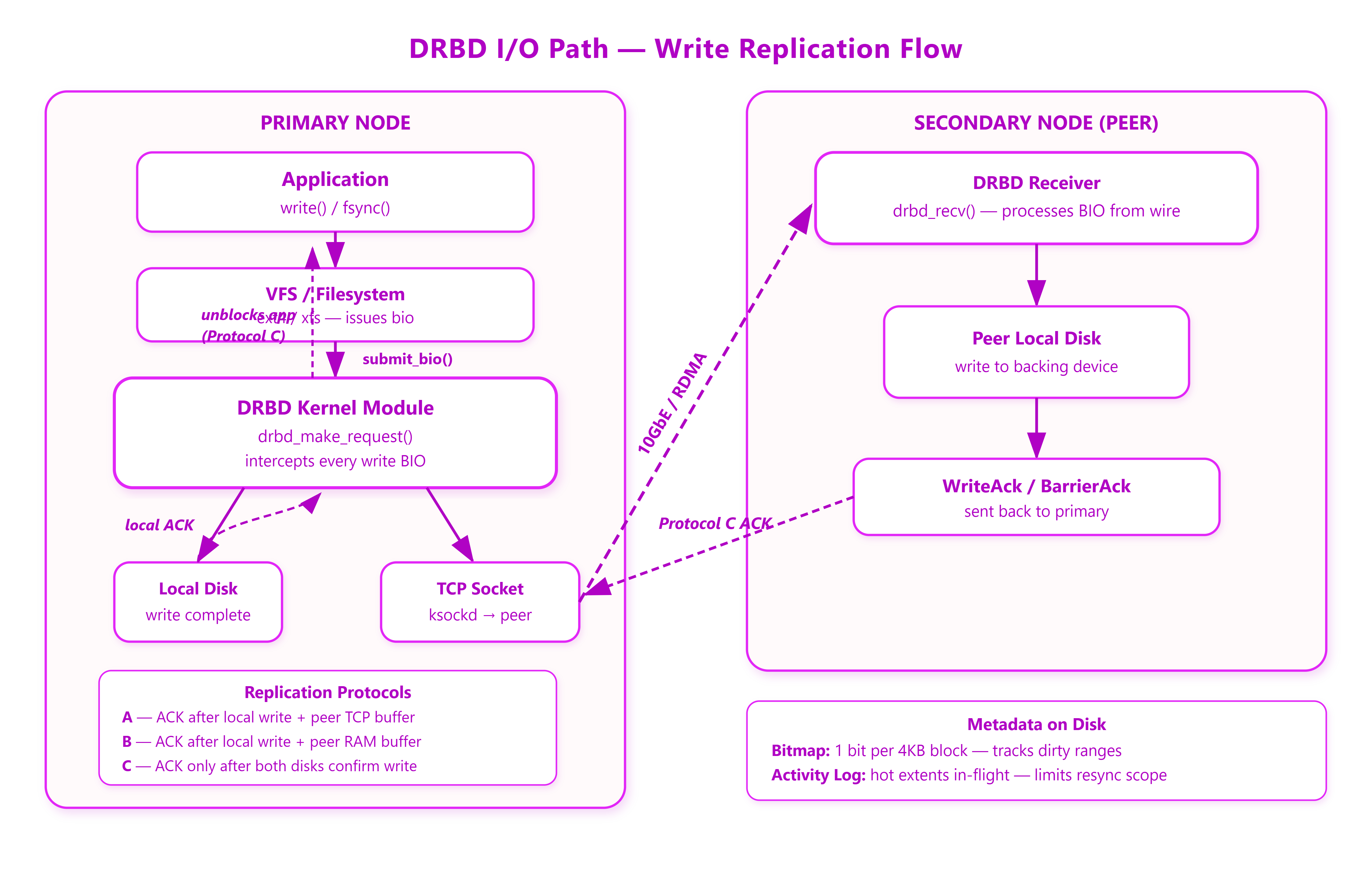
drbd.ko— that registers itself as a block device driver. When you configure a DRBD resource, it presents a virtual block device (/dev/drbdX) to the filesystem above it, while internally it owns two I/O paths: one to local storage and one to a peer node over TCP (or RDMA in DRBD 9).The critical insertion point is
submit_bio. Every write BIO destined for a DRBD device gets intercepted atdrbd_make_request(). From that moment, the kernel’s write-ahead logic is paused until DRBD decides the write is safe, according to whichever replication protocol you’ve configured.
The Three Protocols and What They Actually Cost
Protocol A is asynchronous: the write is acknowledged once it hits local disk and enters the peer’s TCP send buffer. The peer’s disk write happens independently. Throughput is near-native. Recovery after a crash means the peer may be missing the last N seconds of writes — you’ve traded durability for speed.
Protocol B acknowledges when the write hits local disk and the peer’s memory buffer. Still no guarantee the peer wrote to disk. Slightly safer than A, equally fast on a reliable network.
Protocol C is what you actually want for HA databases. The write is not acknowledged until both nodes have confirmed a completed disk write. Your application’s fsync() call returns only after two disks have spun (or two NVMes have flushed). On a 10GbE link in the same rack, round-trip latency is sub-millisecond. On a stretched cluster across two datacenters, that RTT is your write latency floor — every write blocks for it.
The failure mode people hit: they deploy DRBD 9 with Protocol C between datacenters, benchmark single-threaded write throughput, and wonder why PostgreSQL checkpoint takes four times as long as on the primary alone. The answer is in perf trace: writes that used to complete in 300µs now show 2.8ms median because they’re waiting on a 2.6ms RTT to the DR site.
Activity Log and Bitmap: The Crash Recovery Story
Two persistent data structures live in DRBD’s metadata region (either at the end of the data device or on a separate --external device): the activity log and the bitmap.
The bitmap is a per-4KB-block dirty map. Any block written while a peer is disconnected gets a bit set. When the connection re-establishes, only those dirty blocks need to be synchronized — not the whole device. A 2TB device with 100MB of changes resynchronizes those 100MB, not 2TB.
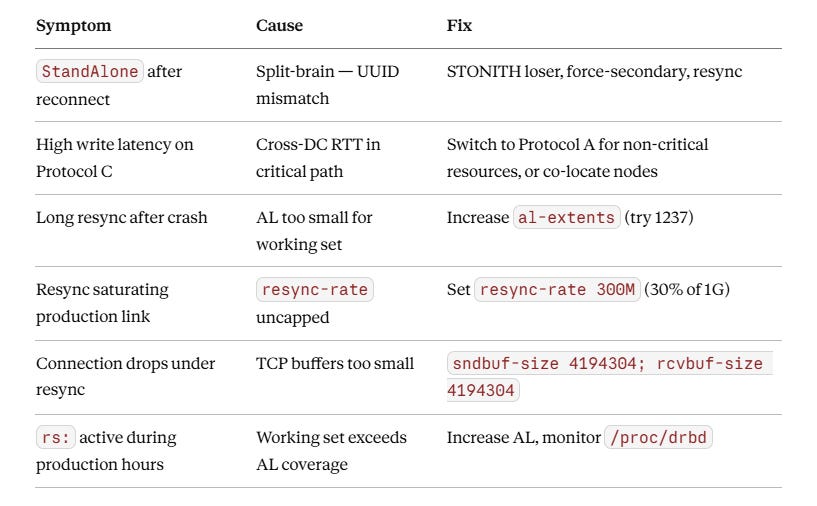
The activity log is smaller but more subtle. It tracks which 4MB extents are “hot” — currently being written. On crash recovery, if the peer was connected, only AL-dirty extents need resync before the device can return to UpToDate state. Default AL size is 128 extents (512MB of coverage). Under a write-heavy workload that touches more than 512MB of distinct extents simultaneously, you start generating false positives: more extents marked hot than are actually dirty, leading to larger-than-necessary resync windows after restarts.
The fix is to increase al-extents in your resource configuration. Larger AL means more metadata writes to track the log, but smaller crash resync. On NVMe primary storage this is almost always the right trade.
→ Subscribe now to access source code repository - 200 + coding lessons
Split-Brain: The Failure That Corrupts Silently
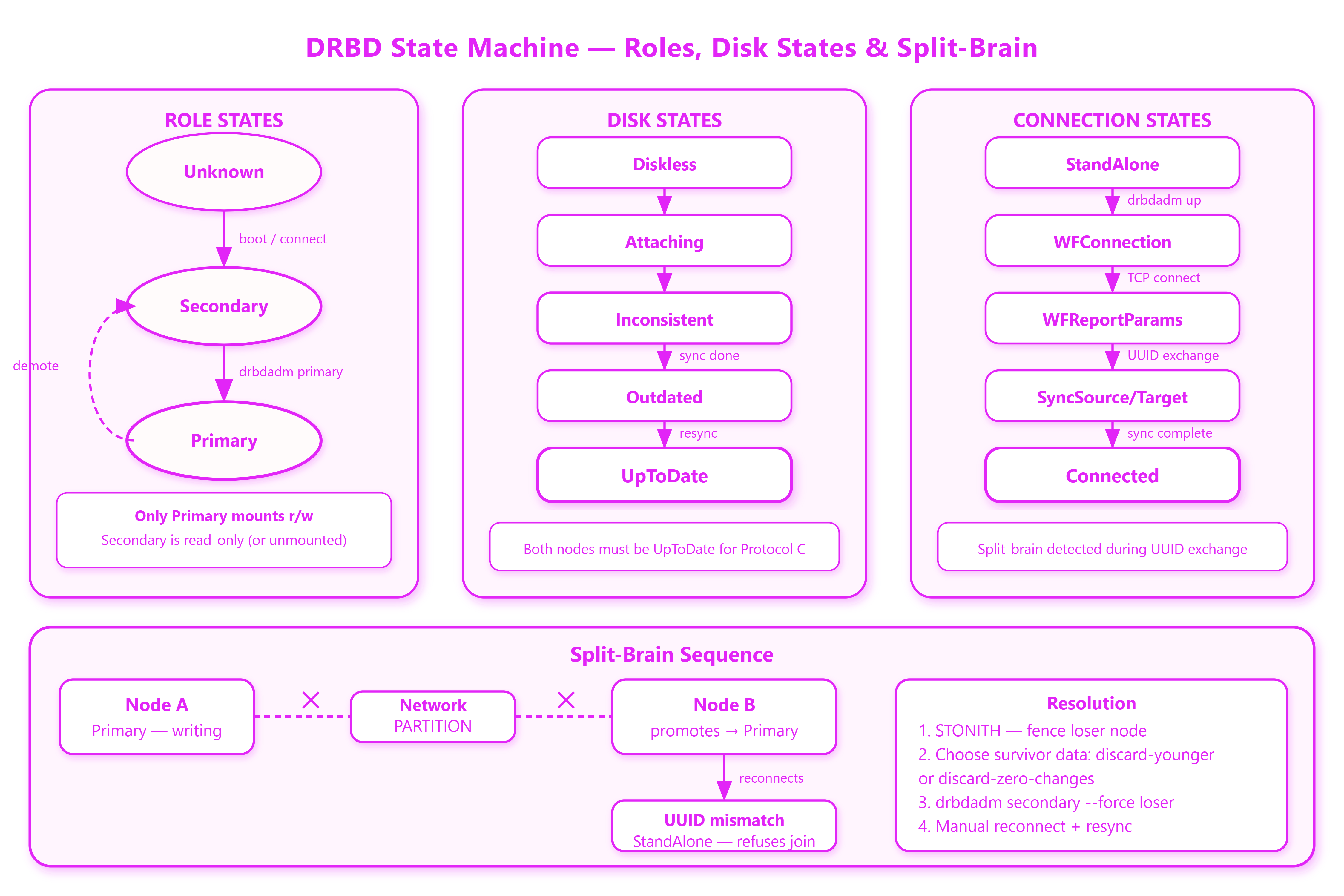
A split-brain occurs when both nodes simultaneously believe they are Primary — both accepting writes, both diverging. DRBD detects this during reconnection by comparing generation identifiers (UUIDs) that advance with each role promotion. When it sees two primaries with diverged histories, it refuses to reconnect and marks one node StandAlone.
What it does not do is automatically pick a winner. The right resolution depends on your workload. after-sb-0pri / after-sb-1pri / after-sb-2pri settings define the automatic policy when one or zero primaries exist post-reconnect, but the two-primary case always requires manual intervention or a fencing policy that guarantees one node is dead before reconnection happens.
Fencing (resource-and-stonith, or integrating with Pacemaker’s STONITH) is not optional for synchronous HA. Without it, the split-brain scenario is not theoretical — a flaky network card that loses and restores connectivity in a 30-second window will trigger it.
Production Tuning That’s Not in the Manual
The default TCP socket buffer sizes (65536 send/receive) are far too small for a 10GbE link under resync load. DRBD uses kernel sockets (ksockd) and they inherit the system defaults unless you override sndbuf-size and rcvbuf-size in the net section of your resource config. On a 10GbE link, 4194304 (4MB) is a reasonable starting point.
Resync rate limiting (resync-rate) is equally critical. An uncapped resync will saturate your replication link and starve production I/O. Cap it at 30–40% of link bandwidth to maintain latency SLAs while recovery proceeds in the background.
One operational pattern that pays dividends: monitoring DRBD’s /proc/drbd output in your metrics pipeline. The ns: (network sent) and dw: (disk written) counters expose write amplification directly. If dw is consistently 2x ns, you have write amplification from double-writing that’s worth profiling. If resync shows rs: activity during production hours, your AL size is too small.
Putting It Together
DRBD gives you synchronous block replication without SAN hardware. The tradeoffs are explicit: Protocol C adds RTT to every write; AL size governs crash recovery scope; split-brain handling requires fencing to be safe.
Get the protocol choice right for your latency budget, size the activity log for your working set, and deploy STONITH before you need it. The middle of an incident is not the time to learn that your fencing configuration never actually worked.
Part II — Implementation Walkthrough
Github Link :
https://github.com/sysdr/howtech-p/tree/main/day95/drbd-demo-workdir
The Write Path in Kernel Code
DRBD registers as a standard block device via blk_mq_alloc_disk() and hooks submit_bio through its struct block_device_operations. Every write BIO that lands on /dev/drbdX enters drbd_make_request(), where it becomes a drbd_request object — a wrapper that holds references to both the local BIO and the peer’s pending acknowledgement. The request is inserted into an epoch, and the epoch is only closed (and the bio completed back to the caller) when both sides have flushed it to stable storage under Protocol C.
The epoch mechanism is how write ordering is preserved across the network. DRBD sends a P_BARRIER packet when it needs to flush the peer’s write pipeline, ensuring that the peer’s disk sees writes in the same order as the primary’s disk. Without this, a crash on the secondary could leave it with writes out of order relative to the primary, making filesystem recovery impossible even with both sides intact.
/* Simplified: what drbd_make_request does on a write */
static blk_qc_t drbd_make_request(struct request_queue *q, struct bio *bio)
{
    struct drbd_conf *mdev = q->queuedata;
    struct drbd_request *req;

    req = drbd_req_new(mdev, bio);   /* allocate wrapper */
    spin_lock_irq(&mdev->al_lock);
    drbd_al_begin_io(mdev, &req->i); /* mark extent hot in AL */
    spin_unlock_irq(&mdev->al_lock);

    drbd_req_make_private_bio(req, bio); /* queue local disk write */
    drbd_send_dblock(mdev, req);         /* send to peer over TCP  */

    /* Protocol C: bio completion deferred until WriteAck arrives */
    return BLK_QC_T_NONE;
}
The drbd_al_begin_io() call updates the activity log on disk before any data write begins. This write-ahead pattern means a crash mid-write always leaves the AL showing the extent as dirty, which is exactly what you want for correct resync scope after recovery.
Simulating Protocol Latency
The benchmark in drbd_write_sim.c demonstrates the cost of each protocol by injecting accurate latency models. Protocol A completes as soon as the local disk returns. Protocol C waits for both the local disk and the peer’s disk, with the RTT (local or cross-DC) serialized in the critical path:
case PROTO_C_LOCAL: {
    uint64_t rtt   = gaussian_jitter(PEER_RTT_LOCAL, 100);  /* ~800µs */
    uint64_t pdisk = gaussian_jitter(LOCAL_DISK_US, 42);    /* ~350µs */
    sleep_us(rtt + pdisk);   /* blocks: 1.1ms added to every write */
    break;
}
Running this against 200 samples per protocol gives the distribution that matters in practice: p99 latency for Protocol C local is around 2ms; cross-DC Protocol C pushes p99 past 8ms. A PostgreSQL synchronous_commit = on with DRBD Protocol C cross-DC means every transaction commit waits for that 8ms floor.
Activity Log: Why Size Matters Under Heavy Write Load
The default 128-extent AL covers 512MB of hot extents. Under workloads that scatter writes across more than 512MB simultaneously — think large table scans with concurrent OLTP — the AL overflows. When that happens, DRBD must wait for the AL to shrink before it can mark a new extent hot, which throttles write throughput. After a crash, the recovery scope is whatever the AL shows as dirty: if the AL was tracking 128 extents at crash time, those 128 extents (512MB) need resync even if only a handful of blocks in each were actually modified.
Increasing al-extents 1237 (covering ~5GB) reduces false-positive resync scope at the cost of more AL metadata I/O. On NVMe, each AL update is sub-microsecond — the trade is almost always worth it. The simulation in drbd_write_sim.c shows the math directly: 200MB of actual dirty data on a 2TB device resyncs in 1.7 seconds at 120 MB/s when the AL covers it; without AL coverage, the same scenario forces a full 2TB resync taking hours.
Split-Brain Detection via UUID Comparison
DRBD tracks generation identifiers per resource. Each time a node is promoted to Primary, its current-UUID advances. When two nodes reconnect after a partition where both were Primary, drbd_uuid_compare() in the kernel sees two current-UUIDs neither of which is in the other’s UUID history. The connection attempt returns -1 (split-brain), both nodes enter StandAlone, and the device stays blocked for writes:
kernel: drbd drbd0: Split-Brain detected but unresolved
kernel: drbd drbd0: Refusing to connect to avoid data divergence
The resolution workflow is deterministic: fence the node with fewer writes (or the designated loser per policy), force-demote it with drbdadm secondary --force, then let it re-connect and accept a full bitmap resync from the survivor. The discard-zero-changes policy handles the case where one node wrote nothing during the partition.
The split-brain simulation in drbd_write_sim.c illustrates UUID divergence: Node A’s UUID advances by 0x34F (847 block writes) and Node B’s by 0x138 (312 block writes) from the same base, making them permanently incompatible without manual resolution.
ncurses Monitor
drbd_monitor.c provides a real-time view of the resource lifecycle. It drives through a simulated 12-second sync (WFConnection → SyncTarget → Connected, Inconsistent → UpToDate), showing replication lag, write amplification ratio (the dw/ns ratio from /proc/drbd), and activity log hit rate. The monitor polls at 120ms intervals with non-blocking getch() and updates state via update_state() which models the time-based progression without any real DRBD kernel module.
Build Pipeline and Compatibility
The Dockerfile uses Ubuntu 22.04 with clang-14 and libncurses-dev. Both binaries compile clean under -Wall -Wextra -Werror -O2 -std=c11. The write simulator links against -lm for sqrt() and log() in the Box-Muller jitter implementation; the monitor links -lncurses. There are no external dependencies beyond the standard library and ncurses.
make -C src          # builds drbd_write_sim + drbd_monitor
./drbd_write_sim     # outputs protocol latency table + AL/bitmap/split-brain sims
./drbd_monitor       # interactive ncurses dashboard (requires TTY)
Error Reference